Capture Filters
Capture filters provide rules to filter in workloads of interest and discard the rest, resulting in significant reduction in compute resource consumption.
Rules include:
- Pod name regex
- Namespaces to include and exclude
- Explicit BPF statement
Capture Filters impact both Raw Capture and L7 API dissection. Using these filters wisely can significantly reduce compute resource consumption, as consumption is directly correlated with the number of workloads being captured and dissected.
For example, running Kubeshark on an entire cluster without filters can consume significant compute resources, even though most workloads may not be of interest. By focusing on specific workloads, Kubeshark captures and dissects only the targeted traffic, significantly reducing compute resource consumption.
For another method to control resource consumption, see Enabling / Disabling L7 API Dissection.
Capture Filters help you focus on traffic of interest and avoid processing traffic that isn’t relevant.
Setting Default Capture Filter Rules
Default rules can be set in the Helm configuration (e.g., values.yaml):
tap:
  regex: .*
  namespaces: []
  excludedNamespaces: []
  bpfOverride: ""
For example, to process only traffic from pods matching catal.* in the sock-shop namespace while excluding kube-system:
tap:
  regex: catal.*
  namespaces:
    - sock-shop
  excludedNamespaces:
    - kube-system
  bpfOverride: ""
Setting a BPF expression will override the regex and namespace rules:
tap:
  regex: .*
  namespaces: []
  excludedNamespaces: []
  bpfOverride: "net 10.10.0.0/16 or host 12.13.14.15"
Dynamically Changing Capture Filter Rules
You can dynamically set capture filter rules from the dashboard by opening the Settings dialog. The Capture Filters dialog provides the following options:
- By Regex - Filter pods by name using a regular expression
- By BPF Override - Set an explicit BPF expression to override other rules
- By Namespaces - Include only pods from specific namespaces
- By Excluded Namespaces - Exclude pods from specific namespaces
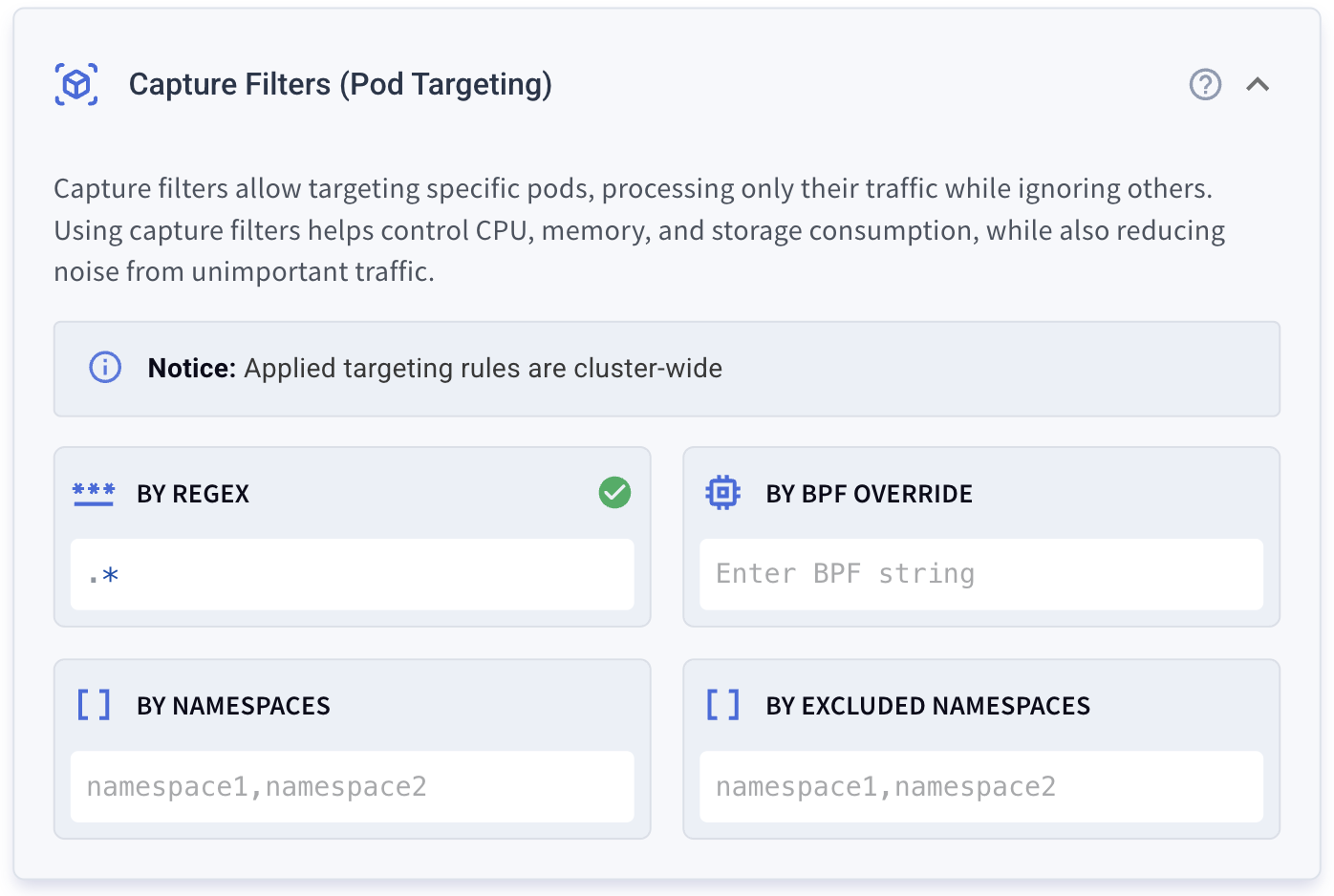
Note: Applied targeting rules are cluster-wide.
Explicit BPF Expression (Traffic Targeting)
Another way to target specific traffic is by using an explicit BPF expression written in BPF syntax. This BPF expression will be used to target traffic, and any Pod Targeting rules will be ignored. Examples of BPF expressions include: net 10.10.0.0/16 or host 12.13.14.15.
Setting an explicit BPF expression that overrides other rules is available only when AF_PACKET is used as a packet capture library. Read here to learn how to explicitly set AF_PACKET as the packet capture library.
Processing Traffic Consumes CPU and Memory
Kubeshark’s resource consumption is directly related to the amount of traffic it processes. This becomes a significant issue in busy clusters. Limiting CPU and memory consumption doesn’t guarantee efficient operation if the allocated resources are insufficient for the traffic volume that Kubeshark needs to handle.
Moreover, the dynamic and distributed architecture of Kubernetes can lead to challenges in tracking and tapping targeted pods, as pods may start and stop, have replicas, and move across nodes.
These Grafana panels show the implications on CPU and memory consumption:

KFL2 vs. Capture Filters (Display vs. Capture Filters)
KFL2 (Display Filters) should not be confused with Capture Filters as they serve different purposes. KFL2 statements only affect the data presented in the Dashboard, whereas Capture Filters determine which pods are targeted and, consequently, which traffic is captured.
For those familiar with Wireshark, KFL2 can be likened to Wireshark’s Display Filters, and Capture Filters to Wireshark’s BPF (Berkeley Packet Filter) filters.